



For General Contractors

Built for General Contractors Who Run Real Jobs.

Manage crews, subs, tasks, photos, and updates from one mobile app — without the chaos of scattered texts and missed calls.

No credit card required Free plan available Set up in under 5 minutes
No credit card required | Free plan available | Set up in under 5 minutes
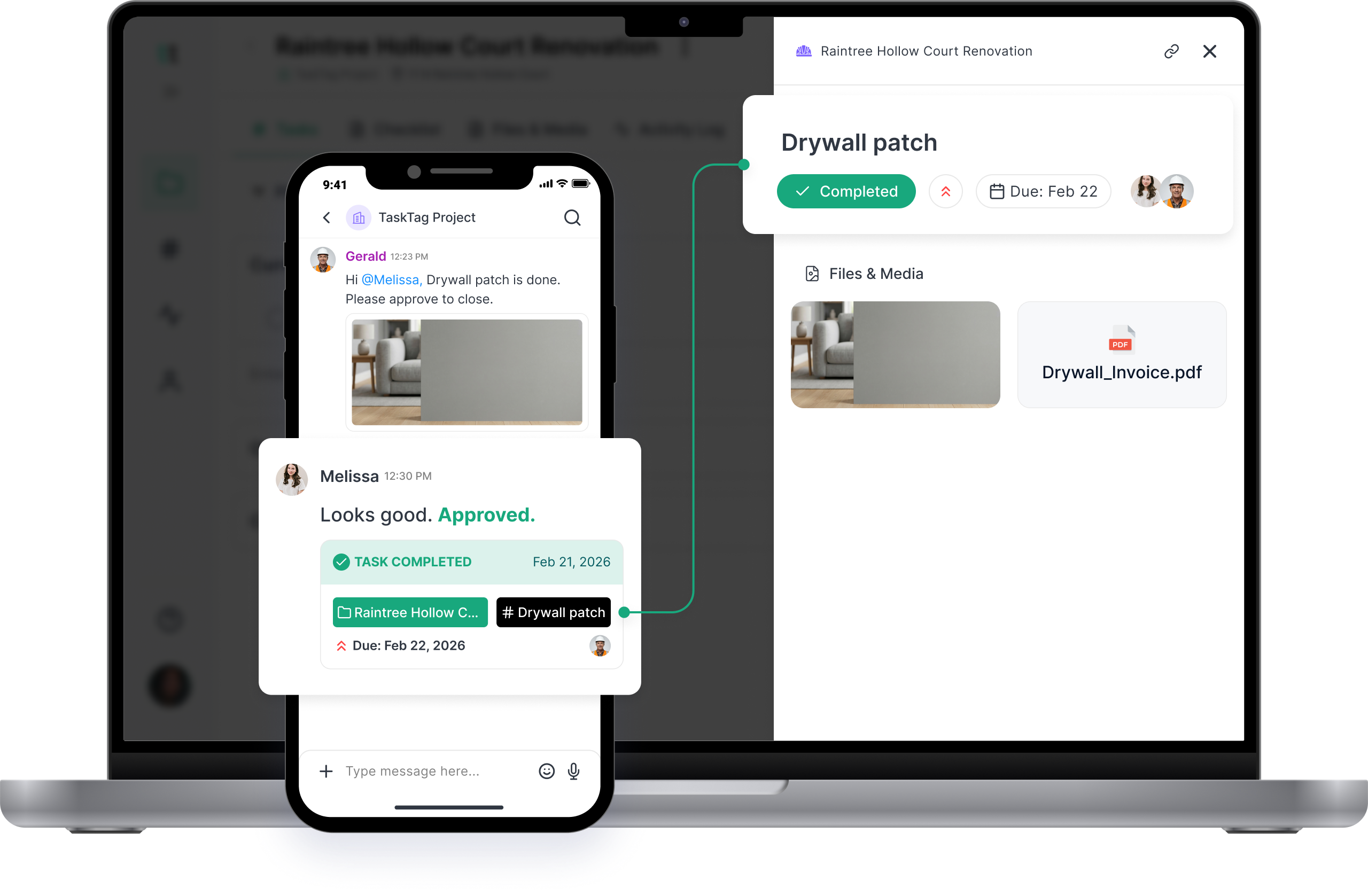
TaskTag project management dashboard showing crew task assignments, site photos, and real-time updates

The Real Cost of Chaos

Every delay, missed call, and lost photo costs you time and money. Here's what we fix.

Chasing Subcontractors

Assign tasks directly. Get photo confirmation when it's done. No follow-up calls.

Missed Updates

One project feed. Every update visible to everyone who needs to see it.

Scattered Jobsite Photos

Photos auto-tag to projects. Find anything by job, date, or task in seconds.

Unclear Accountability

Every task logs who assigned it, who completed it, and when — timestamped proof.

Everything a GC Needs. Nothing Extra.

One app for the whole jobsite — no training required, no app-switching.

Sub Coordination

Invite subs to only their jobs. They see tasks and submit updates — nothing more, nothing less.

Crew Activity

See daily progress across your whole crew — who's on-site, what's done, and what's next — without picking up the phone.

Photo Documentation

Tagged, timestamped photos auto-file to tasks. Built-in proof for every stage of the job.

Punch Lists

Nothing closes without a photo — clean handoff, no disputes.

Zero Learning Curve

Add your crew and subs and you're live in minutes. If they can text, they can use TaskTag.

Raintree Hollow

TaskTag Project
#
Drywall patch
James
#
Set Water Meter
User
New Task
Cancel
Selected Member (1)
OG
Oscar Gilberto
Suggested
James
Owner
OG
James
James Smith12:21 PM
Task Assigned
Feb 21, 2026
Raintree Hollow
Drywall patch
Type message here...
Raintree Hollow
Drywall patch
Attachment
PDF
drywall_notes.pdf
Type message here...
Gerald
Gerald12:23 PM
Drywall patch complete. Invoice attached.
TASK COMPLETED
Feb 22, 2026
Raintree Hollow
Drywall patch
Drywall
PDF
Drywall_Invoice.pdf
Melissa
Melissa12:30 PM
Approved. Sending to accounting.
Type message here...
Melissa Johnson
Melissa Johnson
08:45 AM
Created this task
Raintree Hollow
Drywall patch
Melissa Johnson
Melissa Johnson
08:45 AM
Added @Oscar Gilberto as Task Assignee
Raintree Hollow
Drywall patch
Melissa Johnson
Melissa Johnson
09:20 AM
Unassigned @Gerald Oliver from this task
1320 Smith Street Road
Foundation Inspection
Oscar Gilberto
Oscar Gilberto
15:44 PM
Completed this task
Raintree Hollow
Drywall patch

Sub Coordination

Invite subs to only their jobs. They see tasks and submit updates — nothing more, nothing less.

TaskTag Project
#
Drywall patch
James
#
Set Water Meter
User
New Task
Cancel
Selected Member (1)
OG
Oscar Gilberto
Suggested
James
Owner
OG
James
James Smith12:21 PM
Task Assigned
Feb 21, 2026
Raintree Hollow
Drywall patch
Type message here...

Crew Activity

See daily progress across your whole crew — who's on-site, what's done, and what's next — without picking up the phone.

Melissa Johnson
Melissa Johnson
08:45 AM
Created this task
Raintree Hollow
Drywall patch
Melissa Johnson
Melissa Johnson
08:45 AM
Added @Oscar Gilberto as Task Assignee
Raintree Hollow
Drywall patch
Melissa Johnson
Melissa Johnson
09:20 AM
Unassigned @Gerald Oliver from this task
1320 Smith Street Road
Foundation Inspection
Oscar Gilberto
Oscar Gilberto
15:44 PM
Completed this task
Raintree Hollow
Drywall patch

Photo Documentation

Tagged, timestamped photos auto-file to tasks. Built-in proof for every stage of the job.

Raintree Hollow
Drywall patch
Attachment
PDF
drywall_notes.pdf
Type message here...

Punch Lists

Nothing closes without a photo — clean handoff, no disputes.

Gerald
Gerald12:23 PM
Drywall patch complete. Invoice attached.
TASK COMPLETED
Feb 22, 2026
Raintree Hollow
Drywall patch
Drywall
PDF
Drywall_Invoice.pdf
Melissa
Melissa12:30 PM
Approved. Sending to accounting.
Type message here...

Zero Learning Curve

Add your crew and subs and you're live in minutes. If they can text, they can use TaskTag.

Raintree Hollow

From first invite to final sign-off — no chaos.

From day one to handoff, one repeatable workflow your whole crew can follow.

Set Up & Invite

Create the project, set the address, and invite your crew and subs with a link. Two minutes, done.

Assign & step back

Create tasks, set deadlines, and let the team work with clear instructions — no calls to explain what's needed.

See the job in real time

Real-time photo updates and task-specific chat. You see what's done, what's stuck, and who to call.

Close Out Clean

Export reports, verify punch lists, and close out the job — all the documentation is already there.

Free Workflow Guides for General Contractors

Implementation-ready playbooks to standardize your processes across every project.

Daily Field Reports with TaskTag
Operations

Daily Field Reports with TaskTag: A Step-by-Step Guide for Construction Pros

Create organized daily jobsite reports that centralize weather logs, crew progress, issues, and photos in one searchable platform — no more scattered texts or lost photos.

Read Guide
Punch List Tracker for Construction Projects
Checklist

How to Use TaskTag's Punch List Tracker for Construction Projects

Consolidate punch item tracking, assignment, and documentation in one platform — avoid callbacks and payment delays with clear photo-verified closeout.

Read Guide
Before and After Construction Photos in TaskTag
Documentation

How to Capture Before and After Construction Photos in TaskTag

Turn your crew into your biggest asset for capturing jobsite transformation with a structured before-and-after photo log.

Read Guide
Track Crew Hours with TaskTag's Timesheet Tracker
Productivity

How to Track Crew Hours with TaskTag's Timesheet Tracker

Keep crew hours accurate and effortless with a dedicated timesheet tracker workflow in TaskTag. Log hours through location-tagged check-ins — all within your existing project workflows.

Read Guide
Preventive Maintenance Scheduling for Construction Teams
Operations

Preventive Maintenance Scheduling for Construction Teams Using TaskTag

Build a maintenance schedule that tracks every task and organizes photos, receipts, and repeatable actions automatically.

Read Guide
Construction Selection Tracking with TaskTag
Management

How to Use TaskTag for Construction Selection Tracking

Centralize client selections, reduce delays, and document approvals with a systematic workflow — so nothing gets lost in texts or email chains.

Read Guide

All guides are free and implementation-ready.
No signup required.

Run jobs without chasing people.

Keep crews aligned, projects documented, and tasks moving — from your phone, on the jobsite.

Knowledge Hub for General Contractors

Practical reads from people who've been on the jobsite.

Frequently Asked Questions

What GCs ask before they switch.

The best app for general contractors combines crew management, sub coordination, task tracking, and photo documentation in one place. TaskTag is built specifically for GCs running multiple projects who need to stay accountable without juggling multiple tools. Key features include real-time updates, mobile-first design, punch list management, GPS timesheets, and cloud document storage — all on the same platform your subs and crew already use.

Modern GCs track subs through task assignments, photo verification, and real-time status updates — not phone calls. In TaskTag, you invite a sub to a specific project, assign tasks with clear instructions, set deadlines, and require photo proof when the work is done. You get a complete audit trail of who did what and when, without the follow-up calls.

The right way to manage punch lists is mobile and photo-first: create each item on-site, attach a before photo, assign to the trade or sub responsible, and require a completion photo before it closes. TaskTag's punch list feature lets you organize items by room, trade, or priority, send reminders, and keep a timestamped history of every item — so closeout isn't a scramble.

The key is centralizing everything in one place rather than switching between apps. TaskTag organizes your projects with automated photo tagging by task and date, centralized communication threads, cloud document storage, and a real-time project view that shows what's happening across every active job — without visiting every site daily.

Successful multi-project management needs a unified view of all active jobs with current status, upcoming deadlines, and team assignments in one place. TaskTag gives you that portfolio view — you can switch between projects instantly, see what's stuck or overdue, and get automated updates so you're never flying blind across your operation.

Stop the chaos. Start building better.

TaskTag is free to start. Your crew will be set up in under five minutes.

Get Started Free

No credit card required · Free plan available · Cancel anytime