How to Track Crew Hours with TaskTag's Timesheet Tracker
Keep crew hours accurate with GPS-tagged clock-ins inside existing project chats — no extra app needed.
Read MoreBusyBusy tells you who worked. TaskTag tells you what got done, what's documented, and what's next.
Get Started FreeBusyBusy
$300/mo
for 30 users · per-seat pricing
TaskTag Teams
$16 Member/Mo billed yearly
*Crew join and use TaskTag for free. Always.
TaskTag pays for itself on the first project.
Marcus R., General Contractor · Phoenix, AZ
Subs, vendors, and clients join TaskTag at no extra cost — always.
GPS-tagged clock-in built into every project thread.
Crew messaging, photos, and tasks in one project conversation.
Start organizing jobs today — no credit card required.
Side-by-side data that helps contractors make the right call before signing up for anything.
$300+
BusyBusy Starting Cost
for 30 users per month — per-seat pricing adds up fast
$16
Member/Mo billed yearly
Crew join and use TaskTag for free. Always.
Free Collaborators
Subs, inspectors, vendors & clients join TaskTag at no extra cost
Everything In One App
Tasks, photos, timesheets & communication — no tab-switching
See exactly how TaskTag stacks up against BusyBusy for field operations.
| BusyBusy $9.99+/user/mo | TaskTag $16/Member/Mo billed yearly Try TaskTag Free | |
|---|---|---|
| Clock-In with Location Stamp | ||
| Photos tagged to the task | Clunky / Limited | |
| Chat-Based Crew Comms | ||
| Field-First Mobile App | Labor Focus | Project Focus |
| Free Plan | ||
| Subs & Client Pricing | Paid per seat | Free |
"I use TaskTag to keep everything organized under one roof. Instead of chasing texts or buried emails, I just pull up the job and show the team exactly what needs fixing—photos, specs, everything, right there."


Watch the Story
Both platforms serve contractors — but they solve very different problems.
Here's how to know which one fits your operation.
Payroll accuracy is your biggest concern
Deep payroll integrations and labor cost reporting
You need detailed labor reporting
Granular breakdowns by employee, job, and date range
Job costing drives your business
Budget vs. actual labor cost tracking per project
GPS enforcement is mandatory
Geo-fenced clock-ins with strict location verification
You have dedicated admin staff
Capable of managing a complex, feature-rich platform
Safety compliance tracking is critical
Built-in safety checklists and incident logging
Communication is scattered
Project chat tied to the job — not buried in a group text
You manage subcontractors regularly
Subs join free — no extra seat costs ever
You need photo documentation tied to projects
Photos tagged to the task — searchable, permanent, off personal phones
Your crews hate complicated software
Field-first UX built for workers, not office admins
You want clients involved without endless emails
Clients can use the same app — they see updates, photos, and progress as it happens
You only want to pay for your core team
Flat $16/Member/Mo billed yearly — Crew join and use TaskTag for free. Always.
In-depth guides on TaskTag features and how they compare to BusyBusy.
Keep crew hours accurate with GPS-tagged clock-ins inside existing project chats — no extra app needed.
Read More
Replace scattered texts and paper forms with centralized photo, note, and progress logging from the field.
Read More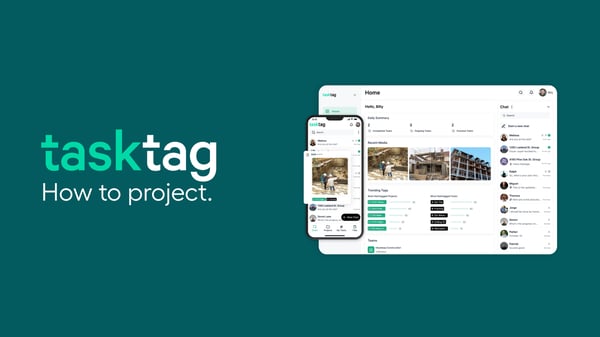
Explore the best field management apps for contractors who need more than just time tracking — photos, tasks, and crew comms included.
Read More
Digital inspection management replacing paper checklists with structured workflows including photo documentation and timestamps.
Read More
Streamline punch list management — create tasks, assign items, document with photos, and track completion to avoid callbacks.
Read More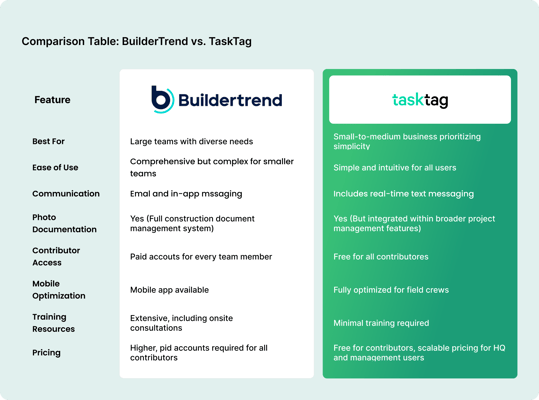
When GPS time tracking alone isn't enough — how adding photos, tasks, and chat changes the way crews work on the jobsite.
Read MoreCommon questions, straight answers for contractors comparing the two platforms.
Yes — especially if you need more than just time tracking. TaskTag includes GPS timesheets (same as BusyBusy) plus photo documentation, task management, and crew chat, all in one app. Crews that outgrow BusyBusy's labor-focused approach typically switch to TaskTag when they need jobsite accountability beyond the clock.
Both platforms offer GPS time tracking, but TaskTag ties clock-ins directly to project threads — so every time entry lives alongside the photos, tasks, and messages for that job. BusyBusy's time tracking is more standalone and labor-focused, with less context around what was actually happening on the jobsite.
Yes. BusyBusy charges per user starting at $9.99+/user/month. TaskTag charges $16/Member/Mo billed yearly for admins and managers — but crew members, subcontractors, and contributors always join and use TaskTag for free. That makes TaskTag significantly more affordable for larger crews.
Yes. Subcontractors and contributors can be added to TaskTag projects at no cost. They get access to the project thread, task assignments, and photos for their scope — no extra seat required, no billing changes on your end.
Yes. GPS timesheets are included in all TaskTag plans. Crew members clock in and out directly from the jobsite, and each entry is tagged with GPS coordinates. No add-on or integration required — it's built in alongside photos, tasks, and crew chat.
TaskTag. It's designed to feel like a group text — crews pick it up in minutes without any training. BusyBusy is functional but more focused on back-office labor reporting, which can feel more complex for field workers checking in from a jobsite.
Yes. TaskTag has a free plan for small teams — no credit card required. The paid Teams plan is $16/Member/Mo billed yearly and includes GPS timesheets, photo documentation, task management, and crew communication. Crew members always join and use TaskTag for free, regardless of which plan you're on.
Yes. You can invite clients, vendors, or subcontractors as contributors to specific projects. They can view photos, tasks, and updates relevant to their scope — without seeing your entire account or requiring a paid seat.
Tasks, photos, GPS timesheets, daily reports, and
crew communication — all in one place.
No credit card required · Free plan available · Cancel anytime